Seeing something wonky on the site? Sorry about that, it's new. I'm working on it...

hello world!
PDF Printover redUX
Redesigning a productivity tool that nobody had time to fix — until the cost of not fixing it became undeniable.
Redesigning a productivity tool that nobody had time to fix — until the cost of not fixing it became undeniable.
(redUX = redesign UX • re-do • ˌriːˈduː)
The PDF Printover tool worked. That was the problem.
When a tool technically functions, it rarely gets prioritised for improvement, no matter how much friction it creates for the people using it every day. At GoodX, that friction was felt most acutely by the support staff responsible for building hundreds of fillable PDF forms during client onboarding. Every new clinic meant a new library of forms. Every form meant navigating a dense, unintuitive interface with no field organisation, no styling shortcuts, and no way to quickly find a field on the PDF.
The tool worked. But it was slow, frustrating, and completely unscalable.
The question became the same one I bring to every project at GoodX: "What's the smallest change that creates the biggest shift for the user?"/
| Company | GoodX Healthcare, a practice management platform for clinics across Canada, South Africa and many other countries |
| My role | Product Designer, sole designer, end-to-end: heuristic evaluation, SME research, concept, iteration, prototyping, stakeholder presentation |
| Team | Canadian CEO (sponsor), Canadian and South African support staff and SMEs |
| Timeline | November 2024 to March 2025 |
| Platform | Web application (desktop) |
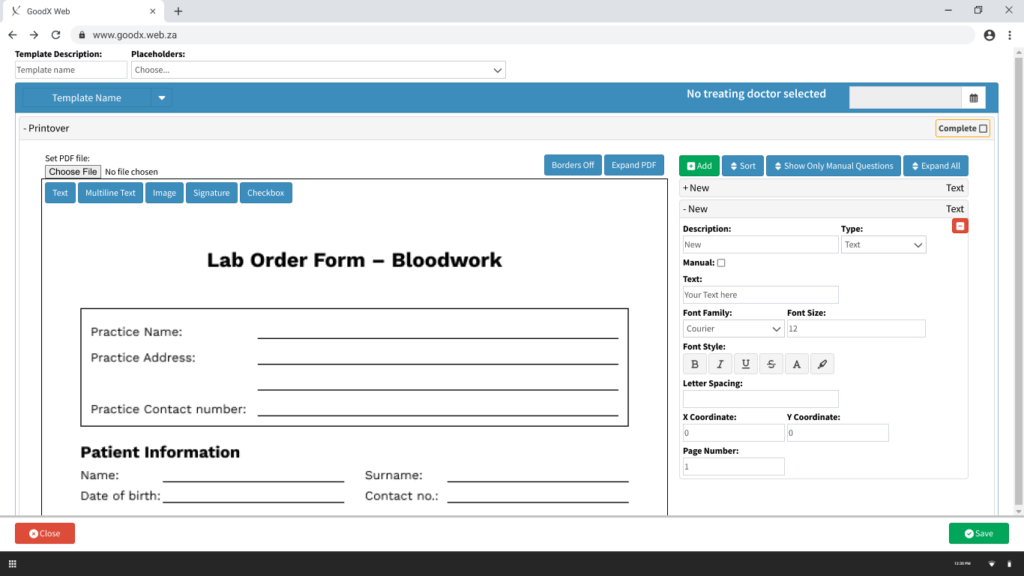
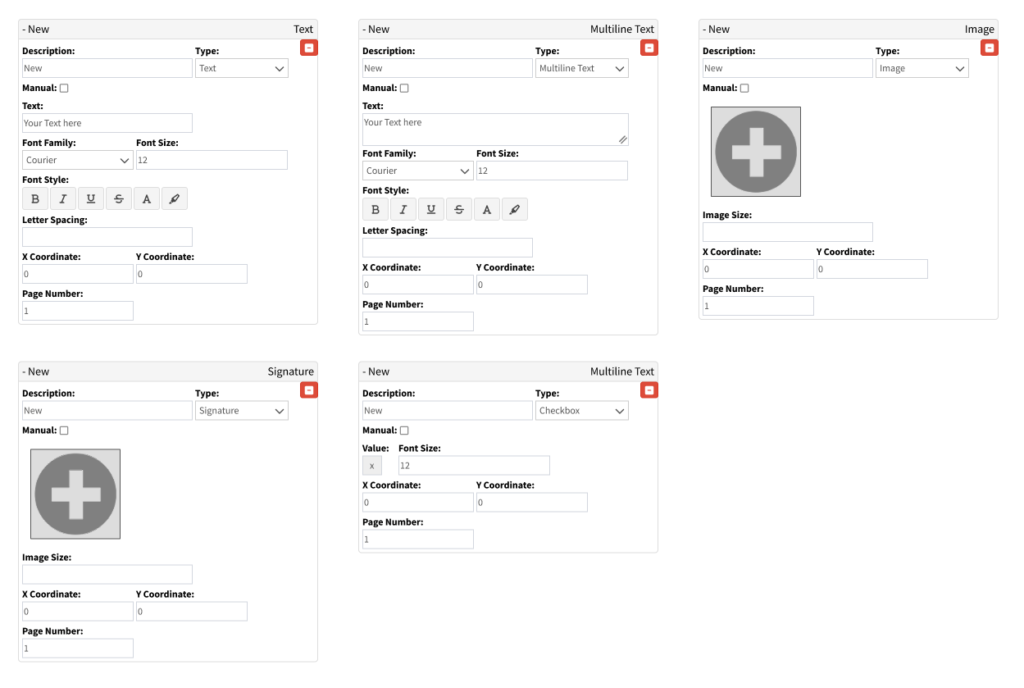
The tool has two modes: template building (creating the form once) and form completion (using it during a patient consultation). The people who felt the most pain were support staff building templates at scale, sometimes hundreds of forms per client onboarding.
The original interface made that slow and error-prone:
The business cost: Six existing support tickets from Canadian and South African users documented specific pain points that had gone unaddressed. The Canadian CEO raised PDF Printover's usability as a direct barrier to efficient client onboarding at the product roadmap meeting.
Usability testing wasn't feasible — the tool's complexity made a testable prototype difficult to produce quickly. Research ran through heuristic evaluation, structured SME feedback sessions with Canadian and South African support staff, and a systematic review of all 6 existing Odoo support tickets.
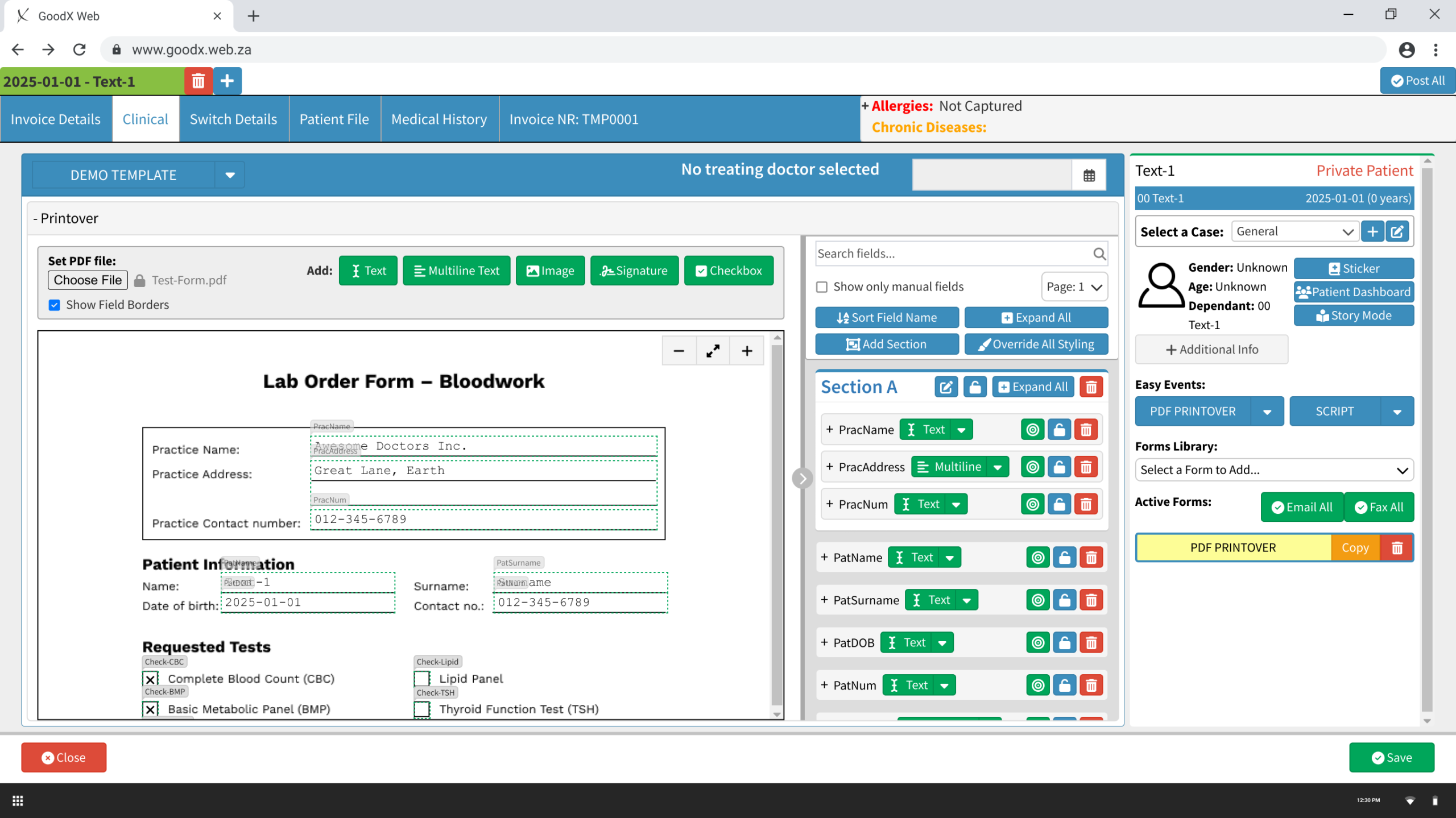
The most impactful decision: move fields into their own dedicated, collapsible side panel, clearly separated from the PDF view. This gave the PDF room to breathe and the fields panel room to be properly organised. The Add toolbar was consolidated, all five field type buttons grouped with a clear label, and zoom controls added to the PDF view.
Every field type was redesigned with four distinct states: default (borders off), default (borders on), active, and locked, with appropriate cursor feedback at each state (pointer, move, resize). Field rows in the panel were restructured: auto-naming on creation (Text-1, Multiline-2), a field type dropdown for quick switching, and three colour-coded action icons, locate (green), lock (amber), delete (red), consistent across all field types.
Clicking the locate icon on a field in the PDF expands and focuses it in the side panel, and vice versa. Two-way sync eliminates the core navigation problem on complex forms. Users always know exactly where they are.
Clicking a field type button attaches a semi-transparent outline to the cursor. The user positions it on the PDF and clicks to place. Auto-named, immediately visible in the panel, ready to configure.
Sections introduce collapsible containers for grouping related fields, practice info, patient details, requested tests. Fields drag into sections in the panel, or are assigned via a dropdown within each field's settings.
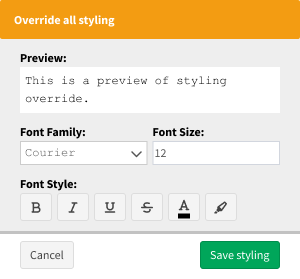
Override All Styling opens a focused dialog with a live preview and font controls applied to all unlocked fields simultaneously. What previously required editing 20 fields individually now takes seconds.
Four additions incorporated after SME review:
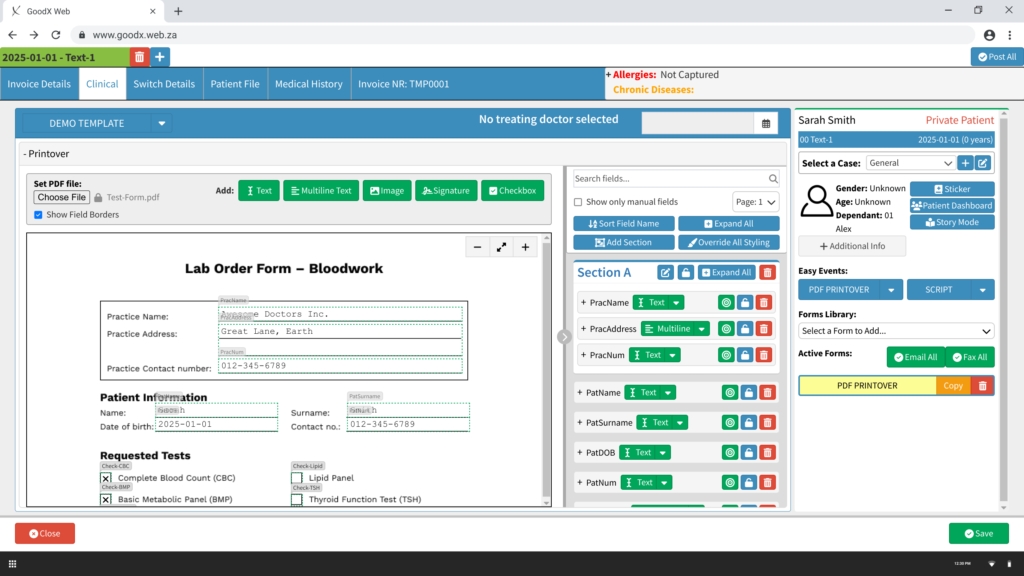
Split panel. Click-to-place fields. Auto-naming. Sections. Global styling. The core workflow that previously required navigating a cluttered single-column interface is now structured, fast, and repeatable at scale.
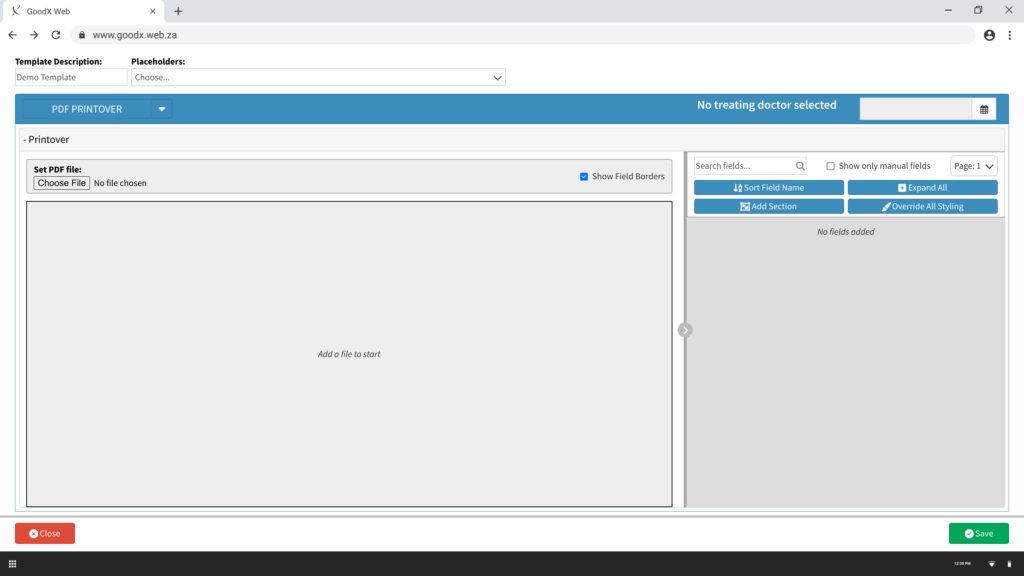
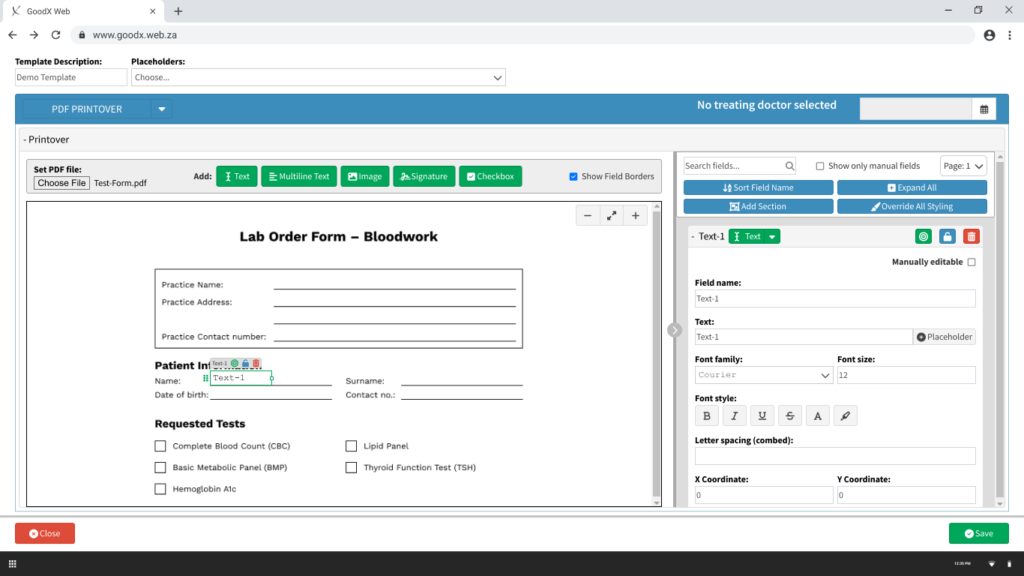
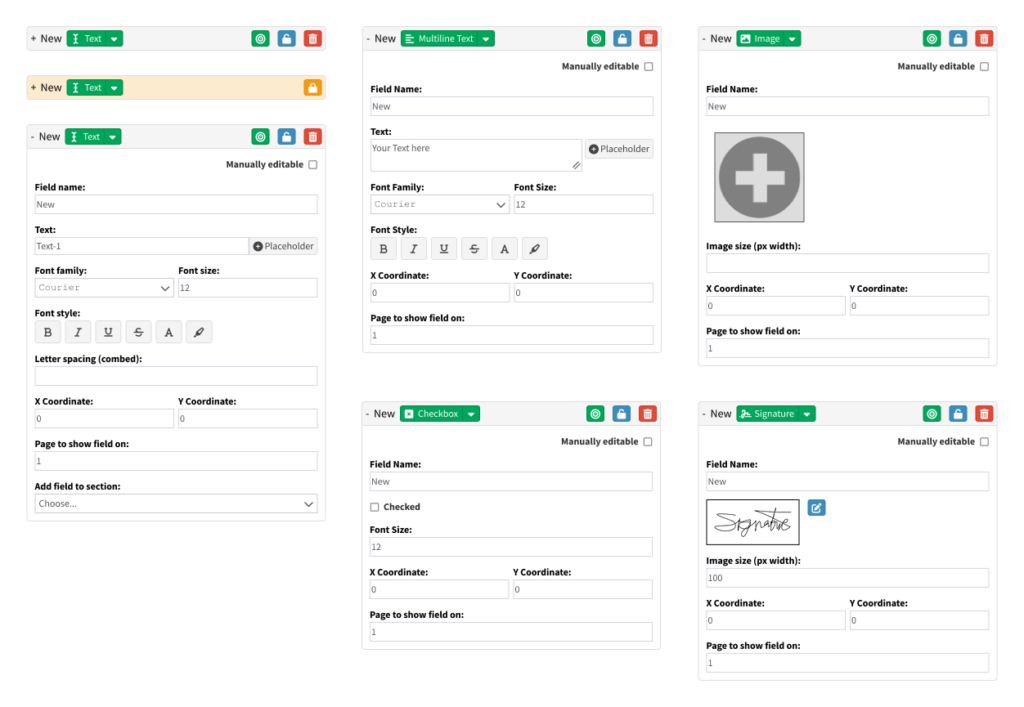
The form completion experience lives inside the patient record, accessible directly from the clinical screen. Auto-populated fields pull in patient data. The two-way locate/sync function means clicking any field on the PDF immediately focuses it in the panel. No hunting, no guessing.
None of these designs made it into the live product. The redesign was presented at the GoodX product roadmap meeting with the Canadian CEO's active advocacy, but was deprioritised by the broader stakeholder group due to competing development priorities, limited SA development resources, and a perception that the pain was felt by a small group of power users rather than the wider client base.
Same honest reality as the Task Screen. The design was validated. The organisational dynamics determined the outcome.
What the project achieved: All 6 Odoo tickets reviewed and addressed. SME feedback from staff across two countries incorporated into four specific amendments. The prototype reached full fidelity across both user flows, ready for development handoff.
What I'd measure if it shipped: Time to build a standard onboarding form template. Support escalations related to PDF Printover during client onboarding. Form completion time per consultation.
What I learned: The "maximum impact, minimum change" principle isn't just a design constraint — it's a communication strategy. Where the advocacy fell short was in making the aggregate cost of the status quo visible: not one support person struggling with one form, but every support person, on every form, for every client onboarded. Numbers move roadmaps. Interface critique moves designers.
See below the presentation slides I created and shared with management and stakeholders.